 Store by Yosef Ashenafi

Kise ኪሴ
Know where every birr goes. Kise reads the SMS your bank already sends.
Downloading Kise. When it finishes, open Kise-1.1.0.apk from your notifications and tap Install. Stuck? See the steps.
Kise installs on your Android phone.
Open this page on the phone: type yosefashenafi.github.io/store in its browser and tap Kise.


What it does
- No typingKise reads the SMS your bank and wallet already send and turns each one into a transaction: amount, fees, payee, reason and balance.
- Made for Ethiopian banksCBE, telebirr, Awash, Dashen, Bank of Abyssinia, Amhara Bank, CBE Birr and M-Pesa.
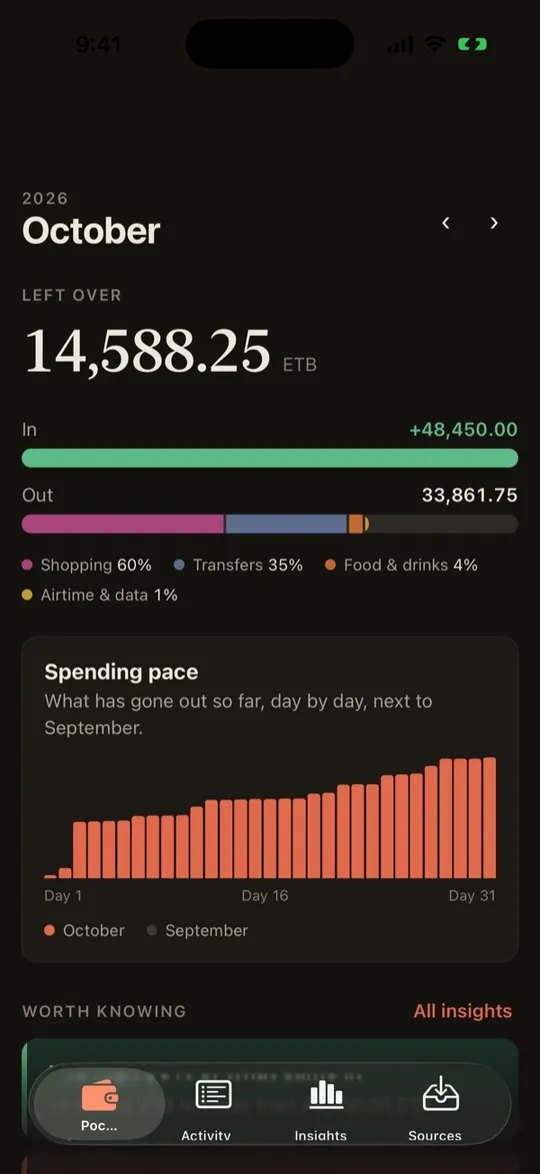
- Where your money wentMoney in and out, what's left over, categories, a spending calendar, your top payees and six months of trend.
- Learns your categoriesChange a category once and turn on "Always use this". Past and future payments to that payee follow.
- Import the last 90 daysStart with a full picture on day one, not an empty screen.
- App lockLock Kise with a 4-digit PIN, and unlock it with your fingerprint if you like, so only you can see your money.
Your money stays in your pocket
Everything is stored only on your phone. There's no account and no sign-up, and nothing is sent anywhere. Kise reads only bank and wallet messages and skips your personal SMS.
How to install
- On your Android phone, tap Download for Android.
- When it finishes, open Kise-1.1.0.apk from the notification or your Downloads, and tap Install. If Android asks, tap Settings and allow your browser to install apps, then go back and tap Install.
- Open Kise and tap Continue and allow, then Allow SMS access. To bring in older messages, open Sources and tap Import the last 90 days.
"App blocked to protect your device"?
Google Play Protect blocks every app that reads SMS when it's downloaded from a browser. The message has no "Install anyway", so pause Play Protect for the minute it takes:
- Open the Play Store, tap your profile picture, then Play Protect, then the gear.
- Turn off Scan apps with Play Protect.
- Open Kise-1.1.0.apk again and tap Install.
- Turn Scan apps with Play Protect back on. Kise keeps working.
If Play Protect only offers to scan it, scan it, then tap Install anyway.
Good to know
- Your data
- Stays on your phone, never online
- New SMS
- Picked up each time you open Kise
- Updates
- Most arrive on their own: close and reopen Kise
- Needs
- Android 7 or newer
- Uninstall
- Hold the Kise icon, then Uninstall
- iPhone
- Runs in Expo Go with a Shortcut